
Function
This function groups the members defined as Tapered Sections. It automatically calculates the sectional properties of the non-prismatic section such that the group section varies uniformly irrespective of the number of segments in the group. The auto-calculated sectional information can be converted into the model data.
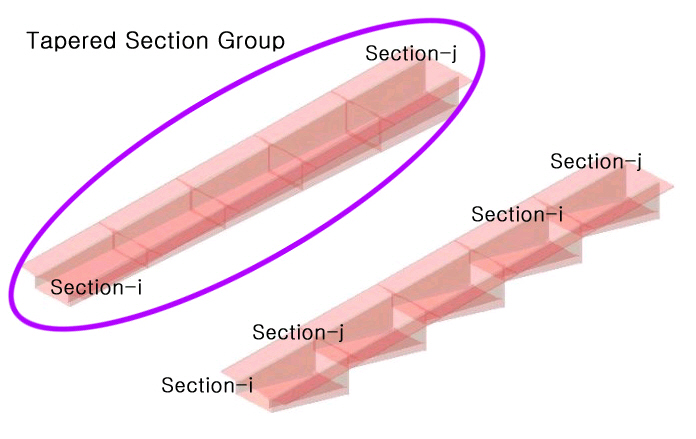
Fig. Tapered Section Group
Call
From the Main Menu select [Properties] tab > [Section Properties] group > [Tapered Section Group]
Input
Tapered Section Group
Define Tapered Section Groups.
Group Name : Name of a variable section group
Element List : The element numbers belonging to the variable section group
Note
Graphical selection of elements on the model screen automatically enters the element numbers in Element List. However, the selected elements should have been defined with an identical variable section property.
Section Shape Variation
The change of section shape along the element local x-axis is defined relative to the element local y & z-axes.
z-Axis (y-Axis) : Change of section dimensions in the element local coordinate system
Linear : Linear variation along the length
Polynomial
Specify an exponent defining the curvilinear function of the section variation in the entry field.
Symmetric Plane
Enter the location where the tangent to the member profile in a polynomial curvature is parallel with the element local x-axis.
From : Reference point to define the plane of symmetry
Distance : The distance from the reference point to the plane of symmetry in the element local x-axis.
Note
In order to define a second order curvature, 3 points on the curve are required. The variable section property data at Section-i and Section-j provide the information on two points, and the Symmetric Plane defines the third point. If the variable section is assumed to be symmetrical in the length direction, the tangent to the curve at the plane of symmetry is parallel with the element local x-axis and perpendicular to the cross-section.
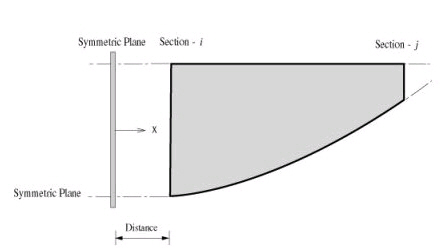
(a) Symmetric Plane at the i-th end
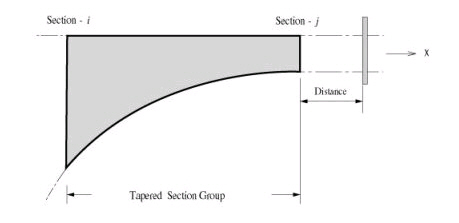
(b) Symmetric Plane at the j-th end
Fig. Application of Symmetric Plane
Click thd Add button to include the defined variable section group in the list. Click the Modify button to change the contents of a section group and the Delete button to delete section groups.
The Convert to Tapered Section... button
The automatically calculated section data are assigned to each element constituting the variable section group. The variable section data corresponding to the number of elements assigned to the group are automatically generated. The sections are then sequentially numbered starting from the defined start number. Once the variable section information of the group is converted into Sections, the group automatically becomes deleted.