
Function
Create or remove elastic links. Two nodes are connected by an elastic link and its stiffness is defined by the user.
Call
From the Main Menu select [Boundary] > [Link] > [Elastic Link]
Input
Click the [...] button to the right of Elastic Link : Display the Elastic Link Table
Boundary Group Name
Select a Boundary Group in which the specified boundary condition is included. Select "Default" if Group assignment is unnecessary. Click the [...] button to the right to prompt the "Define Boundary Group" dialog box to add, modify or delete Boundary Groups.
Option
Add/Replace : Enter or replace elastic links
Delete : Delete previously entered elastic links
Elastic Link Data
Type : Assign an elastic link type.
General Type : General elastic link (6dof)
Rigid Type : Rigid link element
Note
In case of Rigid Type, the element stiffness is automatically calculated based on the working model. The applied stiffness of the link can be checked in the text output file (*.out) after performing analysis.
Tens.-only : Tension-only elastic link
Comp.-only : Compression-only elastic link
Note
When an elastic link is assigned as tension-only or compression-only, only element's axial stiffness can be applied. The elastic link observes the Iteration method defined in Main Control Data identical to tension- and compression-only.
Enter the tensile stiffness and compressive stiffness of a spring symmetrically or asymmetrically. Compression in a spring is defined to be the positive (+) displacement. That is, the stiffness shown in the first quadrant of the left guide diagram represents the stiffness of a spring subjected to compression. Display section data contained in the existing fn.MCB file.
Note Multi-linear elastic link
The slopes in the external sections, which are not defined by the user, are based on the same slopes defined by the last two nodes.
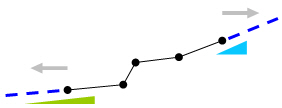
SDx : Stiffness in the element's local x-direction
SDy : Stiffness in the element's local y-direction
SDz : Stiffness in the element's local z-direction
SRx : Rotational stiffness about the element's local x-axis
SRy : Rotational stiffness about the element's local y-axis
SRz : Rotational stiffness about the element's local z-axis
Shear Spring Location
Save the locations of shear springs used in elastic link elements.
Distance Ratio From End I
Specify the locations of the shear springs relative to the length of the elastic link elements starting from i-node.
Direction : Enter the direction of a spring with respect to the node local coordinate system
Beta Angle : Angle defining the elastic link orientation
2 Nodes
Enter the node numbers for the 2 nodes to be elastically linked.
Copy Elastic Link
Define simultaneously a number of elastic links by copying the conditions assigned to an elastic link.
Node Inc.
Create a number of elastic link elements using a node increment.
Number of Times : Number of copies
Node Increment : Increment of node numbers
Distance
Create a number of elastic link elements using the distances between nodes.
Axis : Assign an axis direction for copying the elastic link.
Distances : Enter the number of repetitions and/or distances for copying the elastic link.