
Function
Add, modify or delete the properties of general link elements.
General Link elements are used for modeling damping devices, base isolators, compression or tension-only elements, plastic hinges, soil springs, etc. General Link elements can be assigned linear and nonlinear properties using spring properties.
The procedure for boundary nonlinear dynamic analysis is shown below.
| Procedure | Menu |
|---|---|
|
1. Define material properties |
Properties > Material Properties > Material Properties... |
|
2. Define section properties |
Properties > Section Properties > Section Properties... |
|
3. Create elements |
Node/Element > General > Create > Create Element... |
|
4. Define general link properties - Linear properties - Nonlinear properties |
Boundary > Link > General Link > General Link Properties... |
|
5. Assign general link |
Boundary > Link > General Link > General Link... |
|
6. Define boundary conditions |
Boundary>... |
|
7. Enter the static loads |
Load > Static Loads > Static Loads > Self Weight... Load > Static Loads > Advanced > Assign Floor Loads > Assign Floor Loads... |
|
8. Enter masses |
Structure > Type > Structure Type... Load > Static Loads > Masses > Masses... |
|
9. Enter the time history loads 1) Generate time history load for vertical (gravity) loads - Define Time History Load Case - Define Time Forcing Functions (Normal type) - Enter Time Varying Static Load 2) Generate time history load for seismic loads - Define Time History Load Case - Define Time Forcing Functions (Earthquake record) - Enter the ground acceleration |
Load > Dynamic Loads > Time History Load Cases... Time Forcing Functions... Time Varying Static Load... Ground Acceleration... |
|
10. Enter Eigenvalue Analysis Control (Ritz Vector) |
Analysis > Analysis Control > Eigenvalue... |
|
11. Perform analysis |
Analysis > Perform > Perform Analysis... |
|
12. Check analysis results - Displacement / Velocity / Acceleration - Force diagrams - Stresses - Time history graphs of general links - Story Drift |
Results > Time History Analysis > Time History Analysis > T.H Results > Disp/Vel/Accel... Force Diagram (Beam/Truss/General Link)... Stress (Beam/Truss)... Time history graph... Results>Result Tables>Story>Story Drift (Time History Analysis) |
Call
From the Main Menu select [Boundary] > [Link] > [General Link] > [General Link Properties]
Input
To enter or add new properties of general link elements, click the Add button.
To modify the properties of general link elements already defined, select a name from the list of General Link Properties, click the Modify button and change appropriate data entries.
To modify the properties of general link elements already defined, select a name from the list of General Link Properties, click the Delete button and change appropriate data entries.
Name
Enter the name for which the properties of nonlinear link elements will be defined.
Application Type
Select the type of general link element. The types applied to analysis are largely classified into Element Type and Force Type.
Element Type1/ Element Type2 : The Element Type general link element directly reflects the nonlinear behavior of the element by renewing the element stiffness matrix in the process of analysis.
Force Type : The Force Type general link element does not renew the element stiffness matrix. And rather, it reflects the nonlinear behavior indirectly by converting the member force calculated on the basis of the nonlinear properties into an external force.
Property
A specific link element is selected for an Application Type. The Element Type1 provides 3 types; Spring, Linear Dashpot and Spring and Linear Dashpot. The Force Type general link element provides 6 types; Viscoelastic Damper and Hysteretic System used to represent damping devices, Lead Rubber Bearing Isolator and Friction Pendulum System Isolator used to represent base isolators, compression-only Gap element and tension-only Hook element.
Note
Among the Element Type General Link Elements, Spring Type (6 degrees of freedom : Dx, Dy, Dz, Rx, Ry & Rz) can be reflected in Pushover analysis. Also linear and inelastic analyses can be performed if the linear and inelastic hinge properties are assigned to the General Link Element. Inelastic hinge properties can be defined in Model > Property > Inelastic Hinge Property.
Seismic Control Devices Type
A specific link element is selected for an Application Type.
The Element Type 2 provides 5 types; Viscous Damper (Oil damper), Viscoelastic Damper, Steel damper, Hysteretic Isolator (MSS), and Isolator(MSS).
Seismic Control Devices Properties
Select the properties you want to use in the property list for each Seismic Control Devices defined in Seismic Control Devices Properties. When you click the [...] button, a dialog box opens for defining the properties of the type selected in Seismic Control Devices dialog. You can add, modify or delete data.
Description
Enter a brief description for the properties.
Self Weight
Enter the total weight of the general link. The entered self weight is by default equally divided between both ends of link. The ratio of self weight between i-end and j-end can be decided by the user.
Use Mass
The user may specify additional mass for the general link. The ratio of masses between i-end and j-end can be decided by the user.
Note
Self-weight of a General Link should be entered in Total Weight under Self Weight. Entered Total Weight will be applied to the direction assigned from Load>Self Weight for static analysis, and will be converted into nodal masses for dynamic analysis. In addition, check on Use Mass and input Total Mass to use specific mass separately from the nodal masses converted from Total Weight. However, if 'Do not Covert' is selected from Model>Structure Type> Conversion of Structure Self-weight into Masses, nodal masses converted from Total Weight and Total Mass will not be reflected in the analysis.
Linear Properties
Specify whether or not the individual springs of the 6 degrees of freedom of the general link element exist, and enter the corresponding effective stiffness.
Stiffness and Damping are entered for the Element Type, and Effective Stiffness and Effective Damping are entered for the Force Type general link element.
The stiffness or effective stiffness of a general link element is used for linear static and dynamic analyses. If modal superposition and direct integration methods are used in a linear time history analysis, the effective damping applies only when 'Group Damping' is selected for the structure. The Element Type general link element in a nonlinear time history analysis reflects the initial element stiffness based on the entered stiffness.
And if it relates to inelastic hinge properties, the stiffness is renewed in the analysis.
The Force Type general link element, on the other hand, retains the element stiffness based on the effective stiffness. Even if nonlinear properties are defined, the stiffness matrix remains unchanged. Especially, the effective stiffness in a boundary nonlinear time history analysis using the Force Type general link element represents imaginary stiffness to avoid rigid action in the algorithm. If the effective stiffness value is very large in nonlinear analysis, non-convergence may occur in the process of repetitive analyses, and as such an appropriate value should be entered. It is common practice to specify the initial stiffness of damping and isolator devices.
DOF : Check in the box to specify whether or not the springs of the 6 deformation degrees of freedom exist.
Dx, Dy, Dz : Translational deformation degrees of freedom in the x, y & z directions of the Element Coordinate System
Rx, Ry, Rz : Rotational deformation degrees of freedom about the x, y & z axes of the Element Coordinate System
Coupled : Enter 6x6 coupled matrix for linear stiffness and damping.
Nonlinear Spring Properties
Check in the box to specify nonlinear spring properties for the 6 springs of the nonlinear link element by entering the parameters defining the nonlinear properties.
At this point, those springs that can be defined with nonlinear properties are limited to the degrees of freedom, which already have Linear Spring Properties. That is, the limitation applies to the degrees of freedom for which the DOF check boxes of Linear Spring Property are already checked in.
DOF : Check in the box to specify whether or not the nonlinear properties of the corresponding degrees of freedom exist.
Nonlinear Properties : Checking in the box prompts the dialog box. Enter the parameters defining the properties of the corresponding nonlinear springs.
Shear Spring Location
Check in the box to specify the locations of the shear springs.
The locations are defined by the ratios of relative distances from the starting node N1 to the total length. Dy and Dz represent the shear springs in the ECS y and z - axes respectively.
If the locations of the shear springs are specified, the end moments differ due to the shear forces (Difference in moments = shear force x member length). Conversely, if the locations of the shear springs are unspecified, the end moments are always equal without being affected by the shear forces.
Entry of parameters pertaining to nonlinear properties of individual springs
Enter the parameters defining the nonlinear properties of individual springs for 6 types of nonlinear link elements.
Viscoelastic Damper consists of a linear spring and a (non) linear viscosity damper connected in parallel, which are in turn connected by a spring linking two nodes for each of the 6 degrees of freedom. In addition, MIDAS/Gen provides three types of Viscoelastic Damper models.
Damper Type = Maxwell Model
Maxwell Model consists of a linear spring and a viscosity damper connected in series, as shown in the figure below, and is used for Fluid Viscoelastic Device analysis.
Force-displacement relationship of Maxwell Model is given by

Damping (Cd) : Damping coefficient of viscoelastic damper
Reference Velocity (V0) : Value to make velocity term dimensionless
Note
In general, 1.0 will be entered, but it depends on the change in the length units .
Damping Exponent (s) : Exponent defining the nonlinear viscosity damping property of the viscoelastic damper (Viscosity damping force acts in the opposite direction to the deformation rate and is proportional to the absolute value of the deformation rate to the power of s).
Note
Viscosity damper can be modeled as either a linear viscosity damper ( s=1), which is proportional to the deformation rate, or a nonlinear viscosity damper (0.0<s<1.0), which is proportional to the deformation rate to the power of s. In general, Damping Exponent is 0.35~1.00.
Bracing Stiffness (kb) : Stiffness of connecting member (specify the value)
Damper Type = Kelvin (Voigt) Model
Kelvin Model consists of a linear spring and a viscosity damper connected in parallel, as shown in the figure below, and is used for Solid Viscoelastic Device analysis.
Force-displacement relationship of Kelvin Model is given as below. Since the right side is all known terms, the force acting in viscoelastic damper can be obtained from the equation.

Damper Stiffness (kd) : Stiffness of viscoelastic damper
Damping (Cd) : Damping coefficient of viscoelastic damper
Reference Velocity (V0) : Value to make velocity term dimensionless
Note
In general, 1.0 will be entered, but it depends on the change in the length units.
Damping Exponent (s) : Exponent defining the nonlinear viscosity damping property of the viscoelastic damper (Viscosity damping force acts in the opposite direction to the deformation rate and is proportional to the absolute value of the deformation rate to the power of s).
Note
Viscosity damper can be modeled as either a linear viscosity damper (s=1.0), which is proportional to the deformation rate,or a nonlinear viscosity damper(0.0<s<1.0)which is proportional to the deformation rate to the power of s. In general, Damping Exponent is 0.35~1.00.
Damper Type = Damper Brace Assembly Model
Damper Brace Assembly Model is a Kelvin Model connected by a spring, as shown in the figure below, and is used for analyzing the bracing as a vibration control device.
Force-displacement relationship of Damper Brace Assembly Model is given as below. Since the right side is all known terms, the force acting in viscoelastic damper can be obtained from the equation.
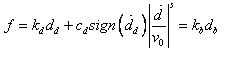
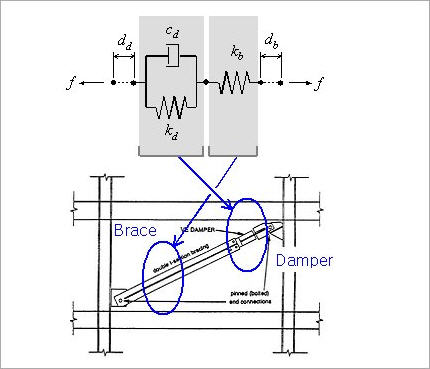
Damper Stiffness (kd) : Stiffness of viscoelastic damper
Damping (Cd) : Damping coefficient of viscoelastic damper
Reference Velocity (V0) : Value to make velocity term dimensionless
Note
In general, 1.0 will be entered, but it depends on the change in the length units.
Damping Exponent (s) : Exponent defining the nonlinear viscosity damping property of the viscoelastic damper (Viscosity damping force acts in the opposite direction to the deformation rate and is proportional to the absolute value of the deformation rate to the power of s).
Note
Viscosity damper can be modeled as either a linear viscosity damper (s=1.0), which is proportional to the deformation rate, or a nonlinear viscosity damper (0.0<s<1.0), which is proportional to the deformation rate to the power of s. In general, Damping Exponent is 0.35~1.00.
Bracing Stiffness (kb) : Stiffness of connecting member (specify the value)
Gap
Gap consists of 6 springs. The deformations of the node N2 relative to the node N1 for all 6 degrees of freedom in the element coordinate system can be represented. If the absolute values of the negative relative deformations become greater than the initial gaps in the springs, the stiffnesses of the corresponding springs will be activated. A linear viscosity damping coefficient can be additionally entered in parallel with each Gap spring.
Stiffness (k) : Stiffness of gap spring
Open (o) : Initial gap within the Gap spring
Hook
Hook consists of 6 springs. The deformations of the node N2 relative to the node N1 for all 6 degrees of freedom in the element coordinate system can be represented. If the absolute values of the positive relative deformations become greater than the initial slippage distances in the springs, the stiffnesses of the corresponding springs will be activated. A linear viscosity damping coefficient can be additionally entered in parallel with each Hook spring.
Stiffness (k) : Stiffness of hook spring
Open (o) : Initial slippage distance within the hook spring
Hysteretic System
Hysteretic system consists of 6 independent springs having the properties of Uniaxial Plasticity. In addition, a linear viscosity damping coefficient can be entered in parallel with each Hysteretic System spring.
Stiffness (k) : Initial elastic spring stiffness before yielding
Yield Strength (Fy) : Yield strength of spring
Post Yield Stiffness Ratio (r) : Ratio of post-yield stiffness to elastic stiffness prior to yielding
Yielding Exponent (s) : Parameter determining the shape of Force-Deformation curve near the yield strength transition region (Larger values lead close to the Bi-linear shape.)
Hysteretic Loop Parameter (α) : Parameter determining the shape of hysteretic curve
Hysteretic Loop Parameter (β) : Parameter determining the shape of hysteretic curve
Lead Rubber Bearing Isolator
Lead Rubber Bearing Isolator retains the properties of coupled Biaxial Plasticity for the 2 shear deformations and the properties of independent linear elastic springs for the remaining 4 deformations. In addition, a linear viscosity damping coefficient can be entered in parallel with the spring of each degree of freedom.
The parameters defining the shear deformation springs are as follows:
Stiffness (k) : Initial elastic spring stiffness before yielding
Yield Strength (Fy) : Yield strength of spring
Post Yield Stiffness Ratio (r) : Ratio of post-yield stiffness to elastic stiffness prior to yielding
Hysteretic Loop Parameter (α) : Parameter determining the shape of hysteretic curve
Hysteretic Loop Parameter (β) : Parameter determining the shape of hysteretic curve
The parameters defining the axial deformation and 3 rotational deformation springs are as follows :
Stiffness (k) : Stiffness of spring
Friction Pendulum System Isolator
Friction Pendulum System Isolator retains the properties of coupled Biaxial Plasticity for the 2 shear deformations, the nonlinear property of the Gap behavior for the axial deformation and the properties of independent linear elastic springs for the remaining 3 rotational deformations. The Force-Deformation relationship of the axial spring of the friction pendulum system type isolator is identical to that of Gap with the initial gap of 0. In addition, a linear viscosity damping coefficient can be entered in parallel with the spring of each degree of freedom.
The parameters defining the axial deformation spring are as follows:
Stiffness (k) : Stiffness of spring
The parameters defining the shear deformation springs are as follows :
Stiffness (k) : Initial shear stiffness prior to sliding
Friction Coefficient, Slow (μs) : Friction coefficient for slow deformation velocity
Friction Coefficient, Fast (μs) : Friction coefficient for fast deformation velocity
Rate Parameter (r) : Rate of the change of friction coefficient with respect to the deformation velocity
Radius of Sliding Surface (R) : Radius of the sliding surface curvature
Hysteretic Loop Parameter (α) : Parameter determining the shape of hysteretic curve of shear spring
Hysteretic Loop Parameter (β) : Parameter determining the shape of hysteretic curve of shear spring
The parameters defining the 3 rotational deformation springs are as follows :
Stiffness (k) : Stiffness of spring