
Function
Add, modify or delete the properties of Viscoelastic Damper elements.
Call
From the Main Menu select [Boundary] tab > [Advanced] group > [Seismic Device] > [Viscoelastic Damper]
Input
To enter or add new properties of Viscoelastic Damper elements, click the Add button.
To modify the properties of Viscoelastic Damper elements already defined, select a name from the list of Viscoelastic Damper property, click the Modify button and change appropriate data entries.
To modify the properties of Viscoelastic Damper already defined, select a name from the list of Viscoelastic Damper properties, click the Delete button and change appropriate data entries.
Name
Enter the name of Seismic Device.
Input Method
User input : Select the Damper type, Dashpot type and Properties by user define.
Import Reference DataBase : Select the device among the registered Data Base. Damper type, Dashpot type and Properties are automatically entered for the registered Data Base.
Damper Type
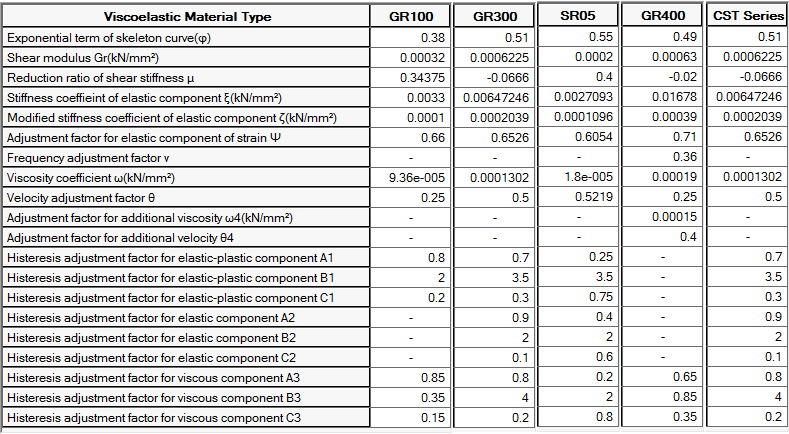
Material Type : Select the type of Viscoelastic material. Supported type and Specification are as follow.
* Check the Material properties by clicking the Show Properties... button in the dialog box.
TDR Damper
-TRC dampers manufactured by Sumitomo Riko Company Limited is added to the viscoelastic material properties
Damper Dimension
- Shear Area : Enter the area of the viscoelastic material of the damper.
- Thickness : Enter the thickness of the viscoelastic material of the damper.
- Max. Limited Deform. : Enter the deformation tolerance of the damper.
- Mount Stiffness (Kb) : Check on the option to consider the damper stiffness. (K1 and K2 are stiffness of viscoelastic material.)
Mechanical Properties
- Dir. : Select the axis direction of deformation by external force.
- Freq. : Enter the frequency of the structure. The default value is 1 Hz, and generally the performance of the damper is not affected by the frequency rangebetween 1 Hz and 10 Hz. It is applicable to the SUMITOMO GR400 only.
- Stiffness Factor / Damper Faction : You can increase / decrease the effect of damper stiffness and damping. It is used when multiple damper is installed in the model of one link. If you enter 2, it can be applied as two damper installed.
- Reference T : Enter the temperature when the damper is operating.
In general, the specification of the viscoelastic damper tested at the temperature of 20 ° C is applied, and the specification at the temperature other than 20 ° C is calibrated and reflected in the analysis using values measured by experiment for each product.
Click the Show Properties... button to check the properties of the selected Viscoelastic material.
Please refer to the table above for specification of supported materials.