
Function
Add, modify or delete the properties of Steel Damper elements.
Call
From the Main Menu select [Boundary] tab > [Advanced] group > [Seismic Device] > [Steel Damper]
Input
To enter or add new properties of Steel Damper elements, click Add the button.
To modify the properties of Steel Damper elements already defined, select a name from the list of Steel Damper property, click the Modify button and change appropriate data entries.
To modify the properties of Steel Damper elements already defined, select a name from the list of Steel Damper properties, click the Delete button and change appropriate data entries.
Name
Enter the name of Seismic Device.
Hysteresis Properties
Hyst. Model : Select the Hysteretic model of the steel damper.
Initial stiffness (K0) : Enter the initial stiffness of the steel damper.
Yield Strength
P1 : Enter the first yield strength of the steel damper.
Stiffness Factor
α1 : Stiffness coefficient after first yielding in compression and tension side. (It is defined as α1 * K0.)
α2 : Stiffness coefficient after second yielding in compression and tension side. (It is defined as α2 * K0.)
Hysteresis Parameters
β : Exponent in Unloading stiffness Calculation
θ : Strength Factor (1.0 ≤ θ, Default value is 1.5)
γ : Stiffness Ratio (0 < γ < 1)Select the Hysteretic model for damping coefficient.
Mounting Parts Stiffness
Kb : Input the additional stiffness depending on the installation of the damper.
Mounting Parts Stiffness
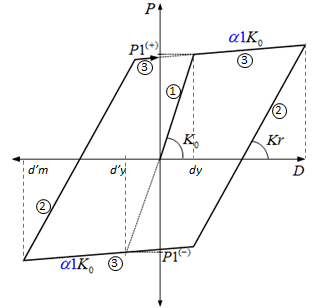
Fig. Degrading Bilinear Model
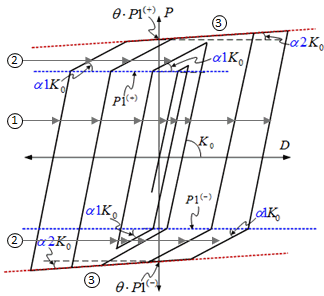
Fig. Low Yielding Strength Steel Model(LY2)
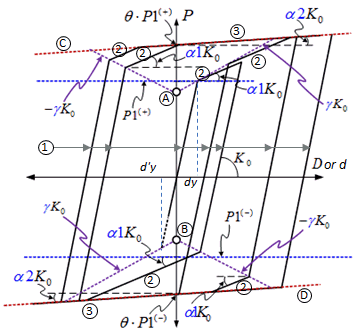
Fig. Low Yielding Strength Steel Mode (LY3)
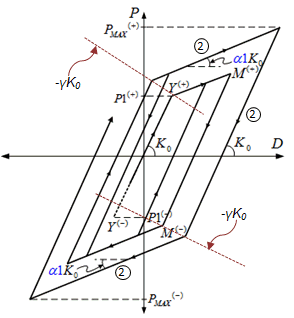
Fig. Steel Isotropic-Kinematic Hardening Model