Function
Check the design results of steel members by numerical components and contours.
Call
From the Main Menu select Design > Steel Design > Result > Steel Design Result.
Input
Load Cases/Combinations
Select the desired load case, load combination or envelope.
Click the [...] button to the right to enter, add or modify load combinations (refer to Load Cases/Combinations).
Components
Select the desired component of the design results from the following :
Axial : Axial stress ratio (strength ratio) component
Shear-y : Shear stress ratio (strength ratio) component in the direction of the strong axis
Shear-z : Shear stress ratio (strength ratio) component in the direction of the weak axis
Bend-y : Bending stress ratio (strength ratio) component due to moment about the strong axis
Bend-z : Bending stress ratio (strength ratio) component due to moment about the weak axis
Combined : Maximum combined stress ratio (strength ratio) component
Type of Display
Assign the type of display as follows :
Contour
Display the design results by contours.
The [...] button
Ranges : Assign the contour ranges.
The Customize Range... button : Assign the coloring ranges for contour lines. The user may assign specific colors for specific ranges.
Note
Contour Range Max/Min values can be larger than the max/min output values.
If the Contour Range values exceed the output values, they are entered at Rank 0 and Rank 11.
Number of Colors : Assign the number of colors for the contour (select among 6, 12, 18 & 24 colors)
Gradient Fill : Display the color gradient (shading) in the contour.
Draw Contour Lines : Display the contour lines by colors.
Colors : Assign or alter the colors of the contour.
Color Tables : Assign the type of Colors.
The Customize Color Table... button : Control the color of each range in the contour.
Reverse Contour : Check on to reverse the sequence of color variation in the contour.
Contour Line : Assign the color for contour boundaries.
Element Edge : Assign the color of element edges to appear in the contour.
Legend
Organize and display various references related to analysis results either to the right or left of the working window.
The [...] button
Legend Position : Select the position of the legend in the output window
Rank Value Type : Specify a type of values in the Legend and the number of decimal points.
Values
Display the selected design result components by means of numerical values.
The font and color of the numbers can be controlled in Display Option.
Note
When checking the Design Result on the screen, if the design result exceeds the limit value, the text is marked in red color.
The [...] button
Decimal Points : Specify decimal points of the displayed numbers
Exp. : Option to express numerical values in exponents
Min & Max : Display the minimum and maximum values
Abs Max : Display the absolute maximum value
Max : Display only the maximum value
Min : Display only the minimum value
Limit Scale(%) : Set the screen limits for displaying design results relative to the maximum or minimum value
Note
The default Decimal Points can be controlled in "Preferences".
Code Checking Ratio
Strength check results for structural steel sections are displayed. (Refer to Note.)
Display : Select the types of elements for which design check ratios will be displayed.
Column Section Size : Display of column section sizes can be scaled.
Value Option : Specify the number of decimal points for displayed values.
Note
Strength check ratios for structural steel members are displayed as follows :
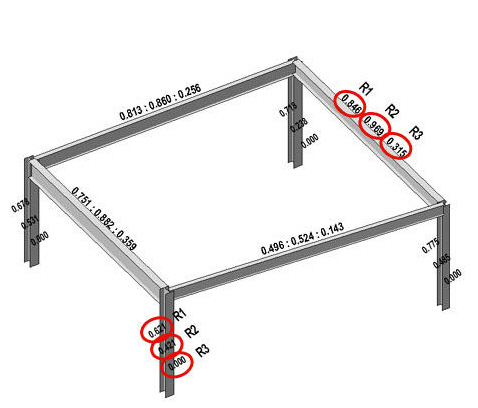
Fig. Strength check results for structural steel members
Strength check results (R1, R2 & R3) for columns and beams are shown above.
Beams
For Eurocode,
R1 : Combined resistance ratio of Axial and Bending moment
R2 : Resistance ratio of Major bending moment
R3 : Resistance ratio of Minor bending moment
For other codes,
R1 : Strength check stress ratio of steel members subject to axial force (compression or tension) and bending moments
R2 : Combined stress ratio of steel members subject to normal stress and shear stress
R3 : Stress ratio of steel members due to shear force only
Columns
For Eurocode,
R1 : Combined resistance ratio of Axial and Bending moment
R2 : Resistance ratio of Major bending moment
R3 : Resistance ratio of Minor bending moment
For other codes,
R1 : Strength check stress ratio of steel members subject to axial force (compression or tension) and bending moments
R2 : Combined stress ratio of steel members subject to normal stress and shear stress
R3 : To be upgraded in a future release (currently displayed as '0')
The Apply button : Apply the displayed strength check ratios to the selected elements.
The Close button : Close the Dialog Bar.
Serviceability
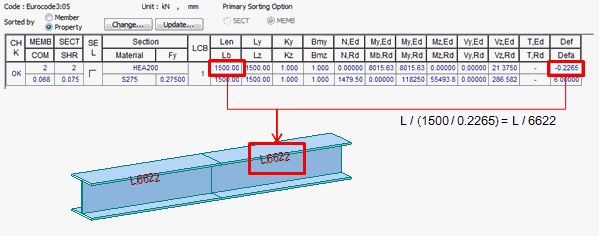
It is supported for Eurocode3, Eurocode3:05, Eurocode3-1-3:06.
Deflection : Display the deflection result.
Display : Show results of beam and column separately.